
Xerox PeopleNet - Creating IT - HR Synergies
🌐 International Buyers — Pay via PayPal
Details
ITSY004
8
2002
YES
300
Xerox Corporation
Home Appliances & Consumer Products
US
Human Capital,Management of Information Systems
Abstract
The case examines the reasons behind Xerox’s decision to implement a HRMS. The software development procedure and the technical aspects have also been explored in detail.
Learning Objectives
The case is structured to achieve the following Learning Objectives:
- Concepts of ODBC, prototyping, phased roll-out etc. in software development.
Contents
“By eliminating unproductive uses of people's time, Xerox PeopleNet makes them more efficient, allowing them to focus their efforts on the important aspects of their job.”
- Karen Mihara, Development Manager, Xerox PeopleNet.
With revenues of $ 18.7 billion in the year 2000, Xerox is a global leader in the document-management business. The company offers a vast range of document products, services and solutions in association with its joint-venture partner, Fuji Xerox Co. Ltd. of Japan. The products include digital printing and publishing systems; digital multifunction devices and copiers; laser and solid ink printers; fax machines; document-management software; supplies (toner, paper, ink cartridges, etc.); and comprehensive document-management services such as running in-house production centers and developing online document repositories.
In the early 1990s, Xerox saw media reports commenting that the functioning of the company's HR department was 'hardly a model of efficiency1.' The company realized that the fully centralized functions of hiring, awarding bonuses and granting promotions were resulting in the central HR department being over-burdened. More often than not, HR personnel were tied up in paperwork that left them little time to use their skills elsewhere. As a result, tasks such as counseling managers on ways to handle employee problems were frequently postponed by HR managers.
Xerox was not happy with its internal job posting process as well. In the existing setup, hiring managers filled in job description forms and sent them to the HR department, where the information was reentered on posting forms. It often took a week before employees could view the job listings, thus delaying the recruitment process considerably.
In 1992, Xerox began to explore the possibilities of using a computer system to release HR professionals from the monotony of administrative tasks. The company decided to install an intranet application to act as a communication and productivity tool for its 50,000 managers and employees. The idea was to deliver traditional human resource information such as benefits, compensation, policy manuals, phone directory and training as well as the ability to change personal information like name and address, to minimize the HR administrative support needed by employees.
In early 1993, Xerox CEO Paul Allaire (Paul) began to put in place measures to achieve the 'Xerox 2000' goals3. Xerox wanted to bring about a paradigm shift in the company's human resource arena and make the workforce much more empowered, productive, accountable and satisfied. The empowerment aspect played a major part in Paul deciding to put basic HR information and applications at the hand of all the personnel through a Human Resource Management System4 (HRMS). Xerox already had a well-established legacy system of general employee and personnel database systems, which it did not want to tamper with. Most of the vendor solutions evaluated initially were designed for use by human resource managers rather than the typical employee or manager, as planned by Xerox. It was thus decided to develop the required HRMS in-house. This marked the beginning of the Xerox PeopleNet initiative.
Research work for the HRMS began in early 1993, and the overall concept of Xerox PeopleNet was formalized by June 1993. Xerox began with an internal HR survey to identify the desired objectives of the proposed system. Suggestions regarding the priorities from which to develop an initial user interface were invited from the employees. The company took the help of consultants Tridec Development Corp. for this purpose.
The company's existing infrastructure comprised workstations and the basic networking hardware under a mainframe environment. Xerox had in the past tried several times to make basic HR information available to employees. However, mainframe technologies were not user-friendly enough for the typical manager/employee skillset. Also, Xerox was shifting from the existing hardware setup to a personal computer (PC) setup. Therefore, a client/server architecture was decided upon as the best choice.
In the early 1990s, client/server technology was still very new and there were no applications being developed on such a large scale. The development team along with the company's 'Global Process and Information Management Group' (GP&IM) began establishing the basic application/system standards for a technical framework.. Prototyping was used to test different development approaches and design the overall graphical user interface (GUI).
The infrastructure support was outsourced from a leading IT services company, Electronic Data Systems. All the software developed was put through strict compatibility testing to ensure that it complied well with other Xerox applications and standard configurations. By the end of 1994, a pilot was developed, which was approved by the company and funds were released for the production version.
In January 1995, a read-only version was launched with simple applications. Xerox opted for a phased launch because it was shifting from mainframes to a PC based setup and the developers needed to understand the new infrastructure well before going in for a full-fledged implementation. The version included applications pertaining to personal employee data, the HR policy manual, employee salary data and fund balances. Screens and queries were designed to help keep the network traffic low. The second phase of the launch included letting the employees change their name, home address and phone number.
To build the software, developers initially considered various vendors offering proprietary APIs available, which enabled the use of PeopleNet's own proprietary interface. However, these APIs locked the software to specific databases and middleware. Xerox then decided to go for Open Database Connectivity (ODBC)11, because it was supported by almost every client application and database. Several ODBC drivers were evaluated including InterSolv's DataDirect ODBC Pack, Oracle' ODBC Driver, Microsoft's ODBC Desktop Database Driver and Intersolv's DataDirect SequeLink.
Xerox finally selected OpenLink Software's Object Broker as it was reportedly very easy to install and it supported both TCP/IP and Novell's IPX/SPX protocols12 equally well. Many other ODBC drivers tested (or the middleware on which they ran) worked better with TCP/IP, but not IPX/SPX. Those that supported the latter were quite slow. Most importantly, OpenLink worked out to be much more cost-effective than the other drivers available.
The server software, based on Oracle 7 Database, ran under Sun Solaris 2.4 on SPARCServer 1000s, with 512 MB of RAM and 10-GB disk arrays. Server software also included OpenLink ODBC Request Broker, which communicated with the ODBC driver on the client. The clients and servers communicated over local and wide-area networks, using TCP/IP and Novell IPX/SPX. The client part of the software was under the Microsoft Windows operating system (version 3.1 on a 386 processor or higher, with 8 MB RAM and 15 MB of available space on the hard drive), written in Visual Basic 3.0 with a local Microsoft Access database (Refer Figure I). The project followed a phased development approach of prototyping, testing, re-testing and then rolling out on a continual basis. Visual Basic was selected as the client development tool because of its ability to facilitate prototyping.
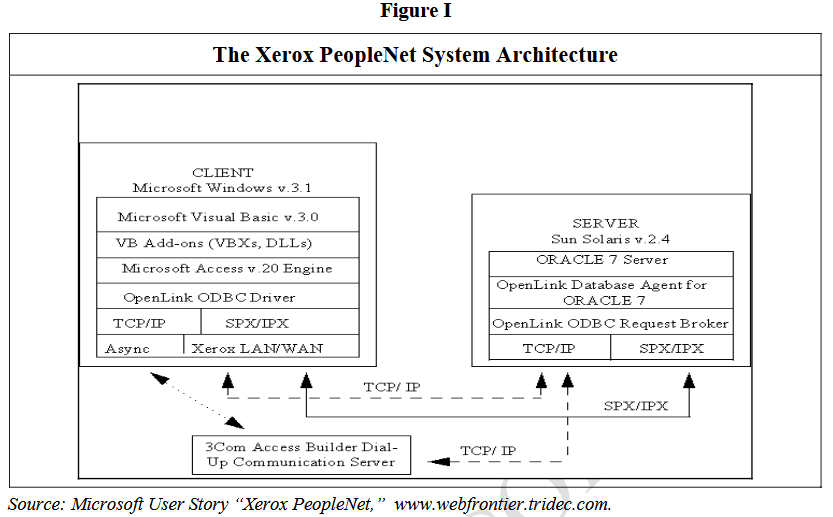
The Microsoft Access engine acted as the invisible middleware13 component, which tracked configuration and routing information and stored cached data. The ODBC Driver worked with a related component on the server to transmit and route requests and data between the client and server. The ODBC driver also provided other functionalities, including transmission-level encryption for data traveling over the network and a query and transport vehicle for automatically updating client systems.
To get the software to the users, Xerox adopted various delivery strategies, viz, shipping to local system administrators, using CDs and floppy disks, the company intranet. To access Xerox PeopleNet, employees had to enter both their social security number and a Xerox PIN number. The software used application-level encryption for passwords as well as transmission-level encryption for data traveling over the network.
As the company was shifting to a PC-based setup, implementation of the system was rather slow and had to be in a phased manner. As the hardware setup stabilized and more features were added, Xerox PeopleNet became increasingly popular within the organization.
Xerox PeopleNet supported applications covering such areas as training, retirement fund performance and a corporate phone directory (Refer Table I). In addition, employees could check Xerox's stock price as well as those of its competitors. The unique feature of Xerox PeopleNet was that unlike typical HRMSs, it did not restrict the availability of information HR staff alone. All employees could access information through any PC on the company's network.
Table I
Xerox PeopleNet Modules
|
|
Source: Microsoft User Story “Xerox PeopleNet,” www.webfrontier.tridec.com.
Xerox PeopleNet cost Xerox around $2 million. However, its benefits far outweighed the investment. The solution helped Xerox accomplish its objectives of empowering its people, increasing satisfaction and boosting productivity. In addition, online publication of the human resources manual and other publications saved approximately $1.5 million annually in printing costs. Online transaction processing and electronic signature approval capabilities added later saved another $1.1 million annually by eliminating manual forms and paper-based processing.
On the hiring front, managers could open the Xerox PeopleNet application on the desktop, create a posting on an online form and post it immediately on a central electronic bulletin board. Any interested Xerox employee could then print an application form and submit it to the hiring manager in paper form. The paper element was to be completely eliminated over a period of time and internal job applications were to be processed entirely online. The system included a feedback feature that let employees suggest new ideas and improvements. As a result, employees were able to monitor their profit sharing and retirement plans and change their contributions from their desktops itself.
Interestingly, Xerox PeopleNet seemed to have had certain undesirable results as well. Commenting on the massive layoffs by Xerox during the 1990s, analysts said that so long as software such as Xerox PeopleNet continued to render personnel redundant, the trend of manpower trimming was likely to continue. However, Mihara seemed to be rather pleased with Xerox PeopleNet, “We now have a vehicle for accomplishing our objective of empowering managers and employees.”
1. Study the software development process of Xerox PeopleNet and comment on the rationale behind opting for ODBC. Also comment briefly on the system architecture of Xerox PeopleNet.
2. Why did Xerox decide to go for a phased development approach (prototyping) for Xerox PeopleNet? Explain how the company reaped the benefits of the system.
Keywords
Xerox, decision, HRMS, software, development, procedure, technical, explored, detail